

Description
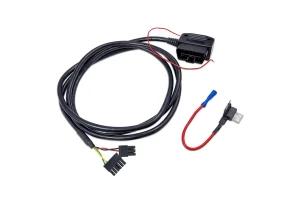
The CANchecked OBD2 Connection Cable for VAG Models is designed to connect compatible CANchecked MFD28, MFD32, and MFD32S Gen2 displays directly to the factory OBD2 port on supported Volkswagen Group vehicles.
Manufactured in Germany, this 2-meter cable provides direct OBD2 and CAN Bus communication, allowing compatible CANchecked displays to access real-time vehicle data and supported diagnostic information.
The cable is specifically designed for VAG applications that use Terminal 15 (Pin 1) as the ignition-switched power source. Once connected, the CANchecked display can monitor supported OBD2 parameters and access stored fault-code information through the vehicle's diagnostic port.
Compatible pre-configured OBD TRI files simplify display setup, allowing supported vehicle data to be configured quickly. The system can display up to 128 OBD2 values, depending on the vehicle and CANchecked configuration.
Fitment
Volkswagen Group Universal Application
Vehicle Group: Volkswagen Group / VAG
Compatible Displays:
- CANchecked MFD28 Gen2
- CANchecked MFD32 Gen2
- CANchecked MFD32S Gen2
OBD2 Configuration: Terminal 15 (Pin 1)
The cable is designed for compatible VW and Audi applications utilizing Terminal 15 (Pin 1) as the ignition-switched power source.
Verify your vehicle's OBD2 pin configuration and compatibility before installation.
What's Included
- 1 × CANchecked OBD2 Connection Cable
- 1 × 2-Meter Cable Assembly
The cable assembly is designed for connection between compatible CANchecked displays and the vehicle's factory OBD2 diagnostic port.
Key Features
- VAG-Specific Application: Designed for compatible Volkswagen Group vehicles.
- MFD28 / MFD32 / MFD32S Compatibility: Designed specifically for CANchecked Gen2 displays.
- Direct OBD2 Connection: Connects the display directly to the factory OBD2 port.
- CAN Bus Communication: Provides CAN Bus communication for supported vehicle data.
- Terminal 15 Support: Specifically configured for applications using Pin 1 as the ignition-switched power source.
- Real-Time Vehicle Data: Allows supported OBD2 parameters to be monitored through the CANchecked display.
- Up to 128 OBD2 Values: Supports display of up to 128 OBD2 values simultaneously on compatible configurations.
- Diagnostic Information: Allows supported stored fault codes to be viewed.
- Pre-Configured TRI File Support: Compatible with CANchecked OBD TRI files for simplified configuration.
- 2-Meter Cable: Provides approximately 6 ft 6 in of cable length for flexible routing.
- Plug-and-Play Design: Designed for straightforward connection between the display and factory diagnostic port.
- Made in Germany: Manufactured in Germany using advanced engineering processes.
Specifications
- Brand: CANchecked
- Product: VAG OBD2 Connection Cable
- Compatible Displays: MFD28 / MFD32 / MFD32S Gen2
- Application: Volkswagen Group / VAG
- Connection Type: OBD2 to CANchecked Display
- Cable Length: 2 meters / approximately 6 ft 6 in
- Ignition Power: Terminal 15 – Pin 1
- Ground: Pins 4 and 5
- CAN High: Pin 6
- CAN Low: Pin 14
- Supported OBD2 Values: Up to 128
- Installation: Plug-and-play
- Manufacturing Location: Germany
OBD2 Pin Configuration
The cable uses the following OBD2 connections:
- Pin 1: Terminal 15 / KL15 ignition-switched power
- Pins 4 & 5: Ground
- Pin 6: CAN High
- Pin 14: CAN Low
This configuration is intended for compatible VAG applications using Terminal 15 on Pin 1.
CAN Bus & OBD2 Integration
The CANchecked connection cable provides a direct communication path between the vehicle's OBD2 port and compatible MFD28, MFD32, and MFD32S Gen2 displays.
Once connected, the display can access supported vehicle information communicated through the OBD2 and CAN Bus systems. Depending on the vehicle and configuration, available information can include engine operating data, diagnostic values, and stored fault codes.
Available data and the number of accessible parameters depend on the specific vehicle, control modules, software configuration, and CANchecked integration.
OBD TRI File Compatibility
The cable is compatible with pre-configured CANchecked OBD TRI files, which can simplify the setup process for supported VAG applications.
Using the appropriate configuration allows the CANchecked display to recognize and present supported OBD2 information without requiring extensive manual configuration.
Installation
The 2-meter cable assembly provides sufficient length for flexible routing between the vehicle's OBD2 port and the installed CANchecked display.
Connect the cable to the compatible CANchecked display and the vehicle's factory OBD2 port according to the supplied wiring configuration.
Before installation, verify that the vehicle uses the required Terminal 15 / Pin 1 configuration.
Vehicle Compatibility & Data Availability
The cable is intended for Volkswagen Group universal applications, but compatibility depends on the vehicle's OBD2 pin configuration and communication protocols.
Available vehicle data depends on the manufacturer, model, model year, installed control units, and software version. Not every VAG vehicle will provide the same range of OBD2 parameters.
Customers are responsible for verifying compatibility with their specific vehicle before purchase and installation.
The standard shipping rate applies to orders within the continental United States. If you intend to place an order outside of the continental US, please reach out to support@x-ph.com for assistance.