
Description
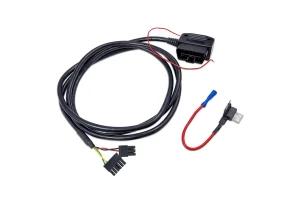
The CANchecked OBD2 Connection Cable for MFD15 Gen2 Displays is designed to provide direct OBD2 and CAN bus communication between a compatible CANchecked display and supported Volkswagen and Audi vehicles.
Specifically designed for applications using Terminal 15 (KL15 / Pin 1) as the ignition-switched power source, the cable allows the MFD15 Gen2 display to access live vehicle data and diagnostic information through the factory OBD2 port.
Once connected, the MFD15 can display real-time OBD2 parameters broadcast by the vehicle's control modules, including engine data, operating values, and stored fault codes. Compatible pre-configured CANchecked OBD TRI files help simplify setup and allow users to configure the display with minimal effort.
The cable supports displaying up to 128 OBD2 values, providing comprehensive access to vehicle data through the CANchecked monitoring system.
With a 2-meter cable length, the connection cable provides flexible routing while maintaining a clean, plug-and-play connection between the MFD15 Gen2 display and the vehicle's diagnostic port.
Fitment
VAG Models – Universal Application
Vehicle Brands: Volkswagen / Audi
Compatible Display: CANchecked MFD15 Gen2
OBD2 Power Configuration: Terminal 15 (KL15) – Pin 1
Application: Vehicles utilizing Terminal 15 / Pin 1 as the ignition-switched power source
Verify your vehicle's OBD2 pin configuration before ordering to ensure compatibility with the Terminal 15 (Pin 1) configuration.
What's Included
- 1 × CANchecked OBD2 Connection Cable
- 1 × 2-Meter Cable Assembly for MFD15 Gen2
Key Features
- MFD15 Gen2 Compatible: Designed specifically for CANchecked MFD15 Gen2 displays.
- VAG Application: Designed for compatible Volkswagen and Audi vehicles.
- Direct OBD2 Communication: Connects the MFD15 directly to the vehicle's factory OBD2 port.
- CAN Bus Communication: Provides direct access to vehicle CAN data through the OBD2 connection.
- Terminal 15 / Pin 1: Optimized for vehicles using Pin 1 as the ignition-switched power source.
- Up to 128 OBD2 Values: Supports displaying up to 128 vehicle OBD2 parameters.
- Real-Time Vehicle Data: Allows monitoring of live engine and operating data from compatible control modules.
- Diagnostic Data Access: Supports access to stored vehicle fault-code information where available through the OBD2 system.
- Pre-Configured OBD TRI Files: Compatible CANchecked OBD TRI files simplify display configuration.
- 2-Meter Cable: Provides additional routing flexibility for clean installation.
- Plug-and-Play Design: Designed for straightforward connection between the MFD15 Gen2 and factory OBD2 port.
Specifications
- Brand: CANchecked
- Product: OBD2 Connection Cable
- Compatible Display: MFD15 Gen2
- Application: VAG Models
- Vehicle Brands: Volkswagen / Audi
- Connection: OBD2 to MFD15 Gen2
- Cable Length: 2 meters / approximately 6 ft 6 in
- Power: Terminal 15 / KL15
- Terminal 15 Pin: Pin 1
- Ground: Pins 4 and 5
- CAN High: Pin 6
- CAN Low: Pin 14
- Maximum Displayed OBD2 Values: 128
- Installation: Plug-and-Play
OBD2 & CAN Bus Communication
The CANchecked OBD2 Connection Cable provides a direct communication path between the MFD15 Gen2 display and the vehicle's OBD2 port.
The cable connects the required OBD2 terminals for power, ground, and CAN communication:
- Pin 1: Terminal 15 / KL15 ignition-switched power
- Pins 4 and 5: Ground
- Pin 6: CAN High
- Pin 14: CAN Low
This configuration allows the MFD15 Gen2 to access compatible vehicle data transmitted through the OBD2 interface.
OBD2 Data Monitoring
When connected to a compatible vehicle, the MFD15 Gen2 can display available OBD2 parameters and diagnostic information from the vehicle's control modules.
Up to 128 OBD2 values can be displayed, depending on the vehicle and available data. Supported information may include engine operating parameters, vehicle values, and stored fault codes.
Actual data availability depends on the specific vehicle, control modules, and OBD2 implementation.
OBD TRI File Compatibility
The cable is compatible with pre-configured CANchecked OBD TRI files, helping simplify the setup process for supported applications.
These configuration files can be used to configure the MFD15 Gen2 for the relevant vehicle and available OBD2 data, reducing the amount of manual configuration required.
Installation
The CANchecked OBD2 Connection Cable is designed for a plug-and-play connection between the MFD15 Gen2 display and the vehicle's factory OBD2 port.
The 2-meter cable length allows the cable to be routed cleanly between the diagnostic port and the display.
Before installation, verify that the vehicle uses Terminal 15 / KL15 on OBD2 Pin 1, as this cable is specifically configured for that power arrangement.
The standard shipping rate applies to orders within the continental United States. If you intend to place an order outside of the continental US, please reach out to support@x-ph.com for assistance.