
Integrated Engineering ECU & TCU Software for VW & Audi | X-PH
29th Oct 2026
A performance tune should not be treated like an isolated modification.
It determines how the engine responds to the fuel in the tank.
It influences how installed hardware is used.
It can change throttle response, boost strategy, power delivery, transmission behavior, and—in more advanced applications—even how the car launches or responds when switching between gasoline and ethanol.
That is why Integrated Engineering software has become such an important part of the modern Volkswagen and Audi aftermarket.
Now available through Extreme Power House, the current IE software catalog spans everything from classic Volkswagen 2.0T and 2.5L platforms to modern MK8 GTIs, Golf Rs, Audi S3s, RS3s, B9 S4/S5/SQ5 models, RS4/RS5 applications, and C8 Audi 4.0T vehicles.
The current XPH search catalog includes 28 Integrated Engineering software-related products, including ECU tunes, upgraded-turbo map packs, Stage 3 software options, and the POWERlink V4 flashing tool itself.
The common idea connecting all of them is simple:
Build the software around the vehicle—not the vehicle around one fixed tune.
More Than a Basic ECU Flash
At its most basic level, ECU tuning changes the software controlling the engine.
The factory calibration has to satisfy a wide range of requirements, including emissions compliance, fuel quality variation, long-term durability targets, global market differences, and performance positioning within the manufacturer’s lineup.
Performance software can recalibrate the engine around a more enthusiast-focused set of priorities.
Depending on the vehicle and software package, IE tuning may alter areas such as:
- Boost targets
- Throttle response
- Ignition strategy
- Fueling
- Torque management
- RPM limits
- Launch behavior
- Exhaust behavior
- Transmission calibration
- Fuel-specific performance maps
The exact features vary significantly by engine, model, software tier, and tuning stage.
That distinction matters.
An older MK5 GTI and a newer B9 S4 may both use Integrated Engineering software, but they do not receive the same feature set or calibration strategy.
Start With Stage 1
For many enthusiasts, Stage 1 is the natural starting point.
Stage 1 software is typically intended for a vehicle retaining its factory turbocharger and a relatively stock hardware configuration, although exact hardware and fuel requirements vary by platform.
The attraction is straightforward.
You can begin improving engine response and available performance without immediately rebuilding the entire supporting system around a larger turbocharger.
On the current MK8 GTI software, for example, IE offers Stage 1 alongside more advanced Stage 2 and APEX options. IE advertises up to 81 horsepower of gain for the applicable Stage 1 configuration using compatible 91- or 93-octane fuel.
That number is specific to that application and configuration—it should not be treated as a universal IE Stage 1 power figure.
Different engines have very different performance potential.
Stage 2: When Hardware and Software Start Working Together
A tune becomes more interesting when it begins taking advantage of upgraded hardware.
That is the idea behind Stage 2.
Instead of calibrating primarily around the standard airflow and cooling hardware, Stage 2 software may require or recommend supporting upgrades that allow the engine to maintain stronger performance under higher load.
On IE’s current B9 3.0T software for the Audi S4, S5, and SQ5, Stage 2 requires a compatible performance intake, upgraded downpipe, and upgraded intercooler.
That requirement illustrates an important point about tuning.
Software cannot make hardware limitations disappear.
If increased boost creates more heat, cooling becomes more important.
If exhaust flow becomes restrictive, the exhaust side needs to be addressed.
If the engine demands additional airflow, the intake system has to support it.
A properly planned Stage 2 build therefore treats the tune, airflow system, cooling system, and exhaust hardware as one package.
Stage 3: Moving Beyond the Factory Turbo
Eventually, some builds reach a point where extracting more from the stock turbocharger no longer makes sense.
That is where Stage 3 tuning and upgraded-turbo map packs enter the picture.
The current XPH IE software lineup includes several examples.
For the MQB platform, XPH currently lists:
- IE Stage 3 GT2260S Turbo Map Pack for MK7 Golf R and Audi 8V S3
- IE Stage 3 GT2260S Turbo Map Pack for MK7 GTI, GLI, and Audi 8V A3
- IE IS38 Turbo Map Pack for MK7 GTI, GLI, and Audi 8V A3
For Audi B9 applications, XPH also carries Stage 3 software options for the A4 and Stage 3 / Stage 3 Plus map packs for the S4, S5, and SQ5.
These products exist because an upgraded turbo changes the airflow capability of the engine dramatically.
The tune has to account for that new hardware.
Stage 3 Plus: When the Entire Supporting System Changes
A serious high-output build often requires more than simply installing a turbocharger.
Fuel supply.
Cooling.
Intake airflow.
Exhaust flow.
Transmission behavior.
And calibration all become increasingly important as output rises.
IE’s current B9 3.0T software is a good example of how wide that tuning progression can become.
For compatible S4, S5, and SQ5 configurations, IE currently offers tuning paths from Stage 1 through Stage 3 and Stage 3 Plus.
IE advertises up to 446 hp with Stage 1, 613 hp with Stage 3, and 739 hp with Stage 3 Plus, depending on the selected fuel, hardware, and calibration.
Those are manufacturer-advertised outputs for that platform—not guaranteed results for every vehicle.
They demonstrate how far the same basic tuning ecosystem can scale as the hardware evolves.
POWERlink: The Connection Between the Car and the Tune
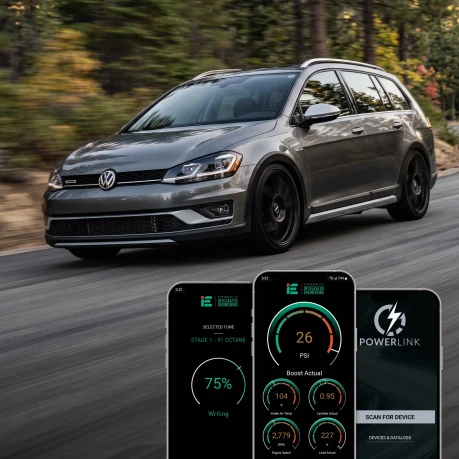
The central hardware tool within the current IE tuning ecosystem is the POWERlink V4.
POWERlink connects to the vehicle through the OBD-II port and allows compatible IE engine and transmission software to be flashed without physically removing the ECU.
Current POWERlink V4 functionality includes mobile flashing through compatible Apple and Android devices as well as Windows-based flashing for supported applications. IE’s mobile interface can also handle functions such as octane changes, stage upgrades, diagnostics, live gauges, and data logging.
That changes the ownership experience considerably.
Tuning no longer has to mean taking the vehicle back to a physical tuner every time the calibration needs to change.
Tune From Your Phone
On supported applications, the POWERlink V4 connects through Bluetooth to the IE POWERlink mobile app.
From the app, owners can perform supported tasks such as:
- Flashing an ECU tune
- Changing fuel or octane files
- Updating tuning stages
- Reading and clearing diagnostic codes
- Monitoring live engine data
- Recording data logs
That puts the tuning interface directly in the driver’s hand.
For an enthusiast who frequently changes fuel, updates hardware, or monitors engine behavior, that convenience can become just as valuable as the initial performance gain.
Mobile Flashing Is Not Universal
An important compatibility point needs to be made:
Not every older IE-supported vehicle can use the mobile app.
IE states that older MK5 and MK6-generation 2.0T and 2.5L platforms—including applicable 3C, B6, 8P, 8U, and 5N applications—require a Windows 10 or newer computer and IE Flash Wizard software rather than mobile flashing.
That does not mean IE no longer supports those vehicles.
It simply means the flashing method differs.
Always confirm the requirements for the exact car before assuming it can be tuned from a phone.
POWERlink V4 vs. Older V3 Hardware
Current mobile flashing requires the newer Bluetooth-enabled POWERlink V4.
IE states that the older V3 device is not compatible with the mobile application.
Existing V4 hardware may also require a firmware update before Bluetooth mobile flashing is enabled.
That firmware process uses IE Flash Wizard on a compatible Windows system.
For customers buying new IE tuning hardware today, the V4 platform is therefore the important version to look for.
Switch Fuel Maps Without Starting Over
Fuel quality makes a major difference in performance tuning.
A calibration designed around 91 octane cannot necessarily make the same power as one designed around 93, 100, race fuel, or ethanol.
IE software commonly provides multiple fuel options where supported.
The POWERlink ecosystem allows compatible owners to switch between available fuel-specific files without purchasing an entirely new tuning platform every time they change fuel.
Older IE POWERlink documentation lists support across tunes with options such as 91, 93, 100, 104, and ethanol blends, with exact availability depending on the application.
The important phrase is depending on the application.
Do not assume every vehicle supports every fuel.
TrueFlex Changes the Ethanol Experience
Traditional ethanol tuning often requires the driver to know the exact ethanol blend in the tank.
For example, a car calibrated specifically for E40 ideally needs the fuel composition to remain near that intended blend.
IE’s TrueFlex system takes a more dynamic approach on supported vehicles.
With the appropriate sensor, software, and hardware, the ECU can use measured ethanol-content data to adjust supported calibration parameters automatically.
On IE’s current B9 3.0T platform, TrueFlex can adjust fueling, ignition timing, and boost strategy according to detected ethanol content.
IE’s broader TrueFlex documentation describes the system as reading actual ethanol content and modifying calibration behavior in real time rather than relying only on a fixed estimated blend.
Pump Gas Today, Ethanol Tomorrow
The appeal of flex-fuel tuning is convenience.
A driver may not always want—or be able—to fill the car with the same ethanol percentage.
TrueFlex can allow supported builds to operate across changing gasoline/ethanol mixtures without requiring a complete reflash every time the blend changes.
On current supported B9 3.0T software, IE describes TrueFlex capability across gasoline and ethanol blends, provided that the required hardware and software are installed.
That last condition matters.
TrueFlex is not simply an option to fill any stock vehicle with E85.
The fuel system, sensor hardware, tune, and vehicle all have to support the intended configuration.
CORE, PRO, and APEX Tune Suites
On newer supported platforms, Integrated Engineering has moved beyond a simple “buy one tune” structure.
Current IE software can be offered through different Tune Suite tiers, including:
CORE
PRO
APEX
The exact differences vary by vehicle, but the concept is that higher software tiers unlock progressively more calibration options, hardware support, and driver-control features.
This allows customers to choose software based on how far they intend to take the build.
CORE: Start With the Fundamentals
CORE is aimed at owners who primarily want the fundamental performance calibration.
That can make sense for a relatively straightforward street car where the main objective is increased power and response without needing every advanced software function.
For many enthusiasts, that may be all the car ever needs.
There is nothing wrong with stopping at Stage 1.
A well-calibrated Stage 1 street car can be more useful than an unnecessarily complicated build.
PRO: Add More Hardware and More Control
The PRO tier on supported platforms can unlock additional tuning possibilities as the vehicle receives more supporting modifications.
For example, current IE B9 3.0T software places Stage 2 maps, adjustable exhaust crackles, TrueFlex ethanol support, and additional controls into higher suite levels rather than making every advanced function part of the entry package.
This gives owners a logical upgrade path as the hardware becomes more serious.
APEX: Advanced Driver-Control Features
APEX represents the more advanced end of IE’s current tuning architecture.
Depending on the vehicle, APEX functionality can include features such as:
- Adjustable Anti-Lag Launch Control
- Rolling Anti-Lag
- Boost-by-gear
- Adjustable throttle behavior
These are not necessary for every vehicle.
But for a more specialized performance build, they provide a level of driver control far beyond what a basic Stage 1 flash offers.
Adjustable Throttle Response
One interesting example of modern software tuning is throttle customization.
The factory accelerator pedal does not directly control the throttle body in a simple mechanical one-to-one relationship.
The ECU interprets pedal input and decides how aggressively the engine should respond.
On the current MK8 GTI tuning package, IE lists 15 adjustable pedal-response settings.
That means two cars with identical peak horsepower can still feel very different depending on how throttle response is configured.
Software changes the character of the car—not just the number on a dyno sheet.
Adjustable Exhaust Crackles
On supported tunes, IE also provides configurable exhaust crackle behavior.
Depending on the application and software tier, users may be able to adjust characteristics such as intensity, duration, and activation behavior.
This is another example of tuning moving beyond simple boost increases.
Owners can personalize how the vehicle behaves and sounds instead of receiving one fixed calibration personality.
Anti-Lag Launch Control
For more performance-focused builds, applicable APEX software can provide adjustable anti-lag launch control.
The objective is to build boost before the vehicle begins accelerating, improving turbo response when launching.
On an all-wheel-drive performance car, that can translate into a considerably more aggressive launch when the complete setup supports it.
Because anti-lag places additional stress and heat into the powertrain, it should be used appropriately rather than treated as an everyday novelty.
Rolling Anti-Lag
Rolling anti-lag applies a similar concept while the vehicle is already moving.
Instead of waiting for the turbocharger to respond after the driver requests full power, the system is intended to help maintain or build boost so acceleration begins more immediately.
IE currently lists Rolling Anti-Lag among its APEX functions on supported platforms.
Again, feature availability varies by car and software package.
ECU and Transmission Tuning Can Work Together
Engine tuning is only one part of the powertrain.
The transmission still has to manage the additional torque.
IE’s POWERlink platform supports compatible ECU and TCU software, allowing both engine and transmission calibrations to be managed through the same ecosystem where supported.
Transmission tuning can become increasingly relevant as engine output rises.
Shift strategy.
Clutch pressure.
Torque limits.
Launch behavior.
And gear selection can all influence how effectively additional engine power reaches the ground.
The exact TCU functions depend on the particular gearbox and software application.
Data Logging: Look Beyond How the Car Feels
A tuned car may feel faster.
That does not tell the whole story.
A data log allows the driver or tuning support team to look at what is actually happening inside the engine-management system.
POWERlink can record high-resolution engine data for supported applications and make that information available for analysis or sharing with IE support.
That becomes especially valuable when:
- Changing fuel
- Adding hardware
- Diagnosing a problem
- Evaluating tune behavior
- Moving to a larger turbo
- Checking a more aggressive setup
Tuning decisions are better when they are based on data rather than guesswork.
Live Gauges on Your Phone
The mobile POWERlink ecosystem can also turn a compatible phone into a customizable display for real-time vehicle data.
IE currently provides live gauge functionality for supported platforms through the mobile app.
This lets enthusiasts monitor available engine information without necessarily installing a collection of standalone gauges around the interior.
Built-In Diagnostics
Another useful feature is diagnostic access.
POWERlink Mobile can read and clear supported trouble codes and check emissions-monitor information.
That does not mean clearing a code repairs the underlying problem.
But having direct access to fault information can make troubleshooting much easier.
For a modified vehicle, that information is especially useful because software and hardware changes often need to be evaluated together.
Keep Your Tune Updated
IE also releases tune updates periodically.
According to IE, these updates can include new features, stability improvements, performance changes, and safety enhancements.
On supported mobile platforms, owners can check the installed tune version through POWERlink and update when a newer version becomes available.
That gives the software an advantage over a completely static calibration installed once and never revisited.
The Current IE Software Range at XPH Is Broad
The present XPH Integrated Engineering software catalog covers a wide range of generations.
Current listings include software for platforms such as:
- VW MK5 GTI, Jetta, GLI and related EA113 applications
- VW MK6 GTI and related EA888 Gen 1/2 applications
- MK6 Golf R
- MK7/MK7.5 GTI and GLI
- MK7/MK7.5 Golf R
- VW Alltrack and Sportwagen
- VW 2.5L five-cylinder applications
- VW MK8 GTI
- VW MK8 Golf R
- Audi 8P A3
- Audi 8V A3 and S3
- Audi 8V RS3
- Audi 8S TT RS
- Audi B8/B8.5 A4, A5, S4, S5, and Q5 applications
- Audi C7/C7.5 A6, A7, S6, and S7
- Audi B9 A4 and Q5
- Audi B9 S4, S5, and SQ5
- Audi B9/B9.5 RS4 and RS5
- Audi 8Y S3
- Audi C8 RS6 and RS7
- Audi S8, SQ7, SQ8, and RSQ8
Availability depends on engine, ECU version, production year, and current IE software support.
EA888: One Engine Family, Many Tuning Paths
The EA888 engine family is one of the biggest areas of IE’s software catalog.
But “EA888” does not describe one single engine.
Different generations appear across a wide variety of VW and Audi vehicles.
The current XPH lineup includes IE software covering older EA888 Gen 1/2 cars, Gen 3 MQB models, and newer MK8-generation applications.
That means customers need to identify more than just displacement.
Generation matters.
Turbocharger matters.
ECU matters.
Vehicle platform matters.
MK7 GTI, GLI & Audi A3: Start Small or Go Big
The MK7-generation 2.0T platform shows how scalable IE software can be.
A relatively simple car may begin with an ordinary ECU tune.
Later, the owner may decide to move to an IS38 turbo setup.
Eventually, a GT2260S build may make sense.
The current XPH IE catalog includes both an IS38 Turbo Map Pack and GT2260S Stage 3 Map Pack for compatible MK7 GTI, GLI, and Audi 8V A3 applications.
The tuning path can therefore grow alongside the turbo hardware.
MK7 Golf R & Audi 8V S3
For the higher-output MQB all-wheel-drive cars, XPH currently carries IE’s standard performance software as well as the GT2260S Stage 3 Turbo Map Pack for the MK7 Golf R and Audi 8V S3.
These cars have long been popular platforms for upgraded turbochargers, fueling, and ethanol.
IE software provides a structured path from a basic tune into a much more developed build.
MK8 GTI, Golf R & 8Y S3
The newer MQB generation introduces an even more software-focused experience.
XPH currently lists performance ECU tuning for both the MK8 GTI and MK8 Golf R / Audi 8Y S3.
On supported MK8 packages, owners can move between different software tiers and access advanced features through the POWERlink ecosystem.
That makes these cars a good demonstration of how modern tuning is evolving beyond traditional fixed flash files.
Audi B9 S4, S5 & SQ5: One of IE’s Most Expandable Platforms
The turbocharged B9 3.0T platform offers one of the clearest examples of IE’s staged approach.
Current XPH software supports Stage 1, Stage 2, Stage 3, and Stage 3 Plus paths for compatible Audi S4, S5, and SQ5 models.
A stock-turbo street build may stop early.
Another car may move through intercooling, intake, exhaust, and eventually upgraded turbo and fueling hardware.
The software grows with it.
Audi RS3 and TT RS Five-Cylinder Tuning
Few modern engines have as much personality as Audi’s turbocharged 2.5L five-cylinder.
The current XPH IE software catalog includes ECU tuning for compatible 8V RS3 and 8S TT RS applications.
These cars have enormous aftermarket potential, making software, fuel, turbocharger choice, and supporting hardware especially important as the build becomes more serious.
RS4 and RS5 2.9T
The B9/B9.5 Audi RS4 and RS5 are also represented in the current catalog.
XPH currently lists IE performance ECU software for the 2.9L twin-turbo platform, giving RS owners another tuning route within the same POWERlink ecosystem.
Audi 4.0T: From C7 S6/S7 to C8 RS6/RS7
IE software also extends into Audi’s twin-turbo V8 platforms.
The current XPH catalog includes tuning for the C7/C7.5 S6 and S7 4.0T EA824, alongside the newer EA825-powered C8 RS6, RS7, S8, SQ7, SQ8, and RSQ8.
These vehicles operate at a completely different performance level from an early four-cylinder GTI, but they can still be managed through the broader IE tuning philosophy.
Older VW and Audi Platforms Are Still Supported
Modern tuning coverage gets most of the attention, but XPH’s catalog also includes software for older enthusiast cars.
Examples include:
- VW 2.5L five-cylinder applications
- EA113 MK5 GTI / GLI
- MK6 Golf R
- Audi 8J TTS
- B8/B8.5 Audi 2.0T
- B8/B8.5 supercharged 3.0T S4/S5
- C7 A6/A7 applications
- 1.8T TSI Gen 3 vehicles
The flashing experience may differ from that of newer Bluetooth/mobile-supported cars, but the software catalog itself spans multiple generations of VW and Audi performance vehicles.
Hardware and Software Should Be Planned Together
One of the best ways to approach IE tuning is to decide where the car is going before purchasing everything at random.
If the goal is a simple daily-driven Stage 1 car, there may be no reason to purchase hardware intended for a much larger turbo setup.
If Stage 3 is eventually the plan, it makes more sense to choose supporting upgrades that fit that future configuration.
That may include:
- Performance intake
- Turbo inlet
- Intercooler
- Downpipe where permitted
- Cat-back exhaust
- Fuel-system upgrades
- Flex-fuel hardware
- Spark plugs
- Upgraded turbocharger
- Transmission software
A well-planned build avoids buying the same category of part twice.
Pick the Tune for the Car You Have Today
At the same time, owners do not need to jump immediately to the most aggressive software available.
A Stage 1 car can still be extremely entertaining.
A Stage 2 setup may offer the balance an owner wants.
Stage 3 may only make sense once the supporting hardware and performance goals justify it.
The best tune is not automatically the highest stage.
It is the calibration that correctly matches the hardware, fuel, vehicle, and intended use.
Fuel Quality Is Part of the Tune
Never choose a map based solely on which one advertises the most power.
The fuel in the tank has to support the calibration.
If a tune is intended for 93 octane, consistently using lower-quality fuel defeats the purpose of choosing that calibration.
Likewise, ethanol-based maps require the correct ethanol content and, where applicable, suitable fueling hardware.
With TrueFlex, some of that process becomes more flexible—but hardware and software compatibility still matter.
Tuning Does Not Replace Maintenance
More performance also makes vehicle condition more important.
Before tuning a higher-mileage or unfamiliar vehicle, it is sensible to verify areas such as:
- Spark-plug condition
- Ignition-coil health
- Cooling-system condition
- Oil condition
- Boost leaks
- Fuel-system health
- Existing fault codes
- Transmission condition
Software should not be used to hide a mechanical issue.
If anything, increasing engine output can expose weaknesses that were less obvious at factory power levels.
Return to Stock When Needed
POWERlink also gives compatible owners the ability to return the ECU to the original stock calibration.
That flexibility can be useful for troubleshooting or changing the vehicle configuration.
However, flashing back to stock should not automatically be assumed to erase the history of previous tuning or eliminate possible warranty implications.
Modern manufacturer diagnostic systems can be sophisticated.
Why Integrated Engineering Software Appeals to Enthusiasts
IE’s software ecosystem works particularly well for enthusiasts who want a clear progression.
You can start with a tune.
Add hardware.
Move to another stage.
Change fuel.
Add TrueFlex where supported.
Move into upgraded-turbo software.
Use POWERlink for flashing and diagnostics.
Monitor the car through live gauges.
Record logs when you need deeper information.
And on newer supported platforms, unlock additional control through PRO or APEX software tiers.
That is much more flexible than viewing ECU tuning as a one-time file that never changes again.
Integrated Engineering Software Highlights
The current IE tuning ecosystem available through XPH includes:
- ECU performance software
- Compatible transmission tuning
- Stage 1 tuning
- Stage 2 tuning
- Stage 3 and Stage 3 Plus software on supported platforms
- Upgraded-turbo map packs
- Multiple fuel and octane calibrations where available
- TrueFlex ethanol functionality on supported vehicles
- CORE, PRO, and APEX suites on applicable newer platforms
- Anti-Lag Launch Control on supported APEX tunes
- Rolling Anti-Lag on supported APEX tunes
- Adjustable throttle-response functionality on supported applications
- Adjustable exhaust crackle settings where available
- Data logging
- Diagnostics
- Live gauges
- Tune updates
- POWERlink V4 mobile flashing on compatible platforms
- Windows Flash Wizard support for applications not supported by the mobile app
Exact functionality depends on the vehicle, engine, ECU, tune tier, and supporting hardware.
Find the Right IE Software at Extreme Power House
The biggest advantage of Integrated Engineering software is not that every car receives the same feature.
It is that IE has built tuning paths around a wide range of Volkswagen and Audi performance platforms.
A MK7 GTI owner may be looking for a Stage 1 tune today and an upgraded-turbo map later.
A B9 S4 owner may be planning a path from Stage 1 to Stage 3 Plus with TrueFlex.
An RS3 owner may be building around the unique 2.5T five-cylinder.
An RS6 owner may simply want to unlock more of the performance available from Audi’s modern 4.0T.
Those are very different builds.
They should not use identical software.
The right IE tune matches the exact vehicle, fuel, hardware, and performance objective.
Explore Integrated Engineering software and POWERlink tuning options at Extreme Power House: https://x-ph.com/search.php?search_query=ieso§ion=product